General Passkey FAQ - Using Passkeys with Paxos Dashboard
Last updated: March 30, 2026
How do I sign in with Passkeys?
You can find further information on signing in with Passkeys here.
How do I add or remove Passkeys?
If you need to add or remove passkeys, you can do so by clicking into your Account Preferences in the top right and clicking into "Manage Passkeys".
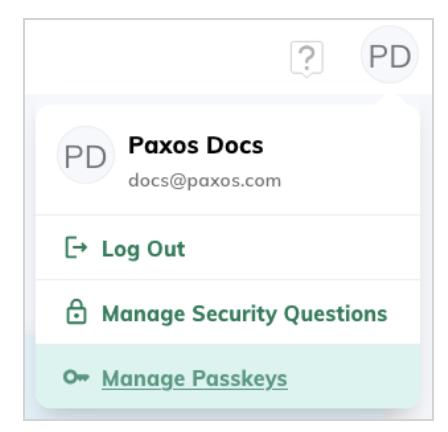
If you get an error message when trying to create a new passkey, the functionality may not available for your current setup. In this case, please set up Account Recovery first by clicking the User icon on the top right corner of your Dashboard and clicking on Manage Security Questions.
Once your security question and answer are set, you can go through the Account Recovery process to set up a second Passkey on a different device.
You can find further information on adding or removing Passkeys here.
What if I lose access to my device or my Passkeys? How do I regain/recover access to my account?
We strongly recommend all users to set up Account Recovery immediately after setting up Passkeys and gaining access to your account. This will allow you to regain access to your account even if you have lost your device of the Passkeys associated with your account.
If you continue facing issues accessing your account, or need a Passkey Reset but have not set up Account Recovery, please reach out to our team via a Support ticket.